Top 10 Reasons a Headphone Mix Gets Noisy Fast
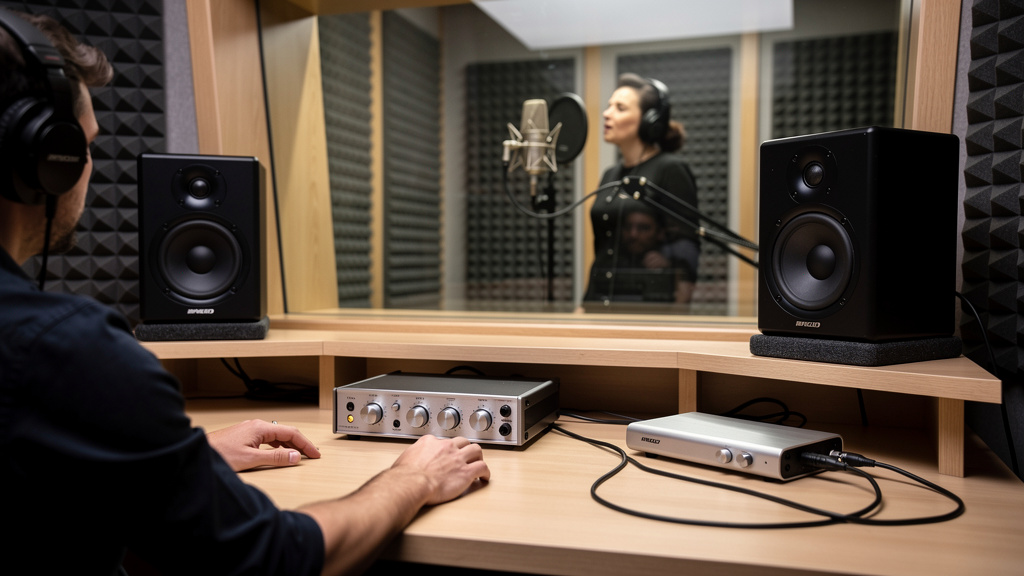
You know the moment: the control-room mix still feels fine, but the artist in the booth says the headphones suddenly sound harsh, noisy, small, or weirdly distorted. So you swap headphones, blame the amp, maybe blame the interface, and lose twenty minutes chasing the wrong thing. Headphone problems are sneaky because they often show up only after a session gets bigger—more cue sends, more plugins, more channels, more level. And by then, nobody in the room is patient.
Most noisy headphone mixes are not caused by a single broken box. They come from small signal-flow decisions stacking up until the cue path runs out of room. Here are the ten causes I see most often when a headphone mix seems to get noisy fast, even though the main mix still feels under control.
1. The cue mix is built from channels that are already too hot
A headphone send can only be as clean as what you feed it. If your vocal input is peaking hard at the preamp, your DAW channel is trimmed down to compensate, and then that channel is sent to a cue bus, the damage is already done before the headphone path even starts. The artist hears edgy transients, grain, and the kind of upper-mid crunch people describe as “cheap headphones.”
This is one reason headphone troubleshooting gets misdiagnosed so often. The bus meter may not be clipping. The headphone amp may still have plenty of knob left. But if the sources feeding the cue are living too close to the ceiling, the roughness follows them downstream.
A quick reality check helps here: if one musician’s cue gets ugly faster than another’s, compare the source channel levels feeding each mix, not just the final headphone output.
2. You are driving the headphone bus like it is a monitor bus
Main speakers and headphones do not tolerate level the same way. A control-room monitor path usually has more acoustic distance, more air, and often more forgiving gain structure. Headphones put the signal right on the ear, so small level imbalances get exaggerated fast.
When engineers build a cue mix by pushing the bus until it “feels exciting,” they often end up with a bus that is technically active but sonically cramped. Cymbals get hashy. Reverb turns into splash. S sounds start spitting. None of that requires obvious clipping to happen.
The fix starts with mindset: headphone mixes usually need better balance, not more bus level. If the performer wants “more me,” it is often cleaner to reduce competing elements than to keep adding gain to the whole send.
3. The performer is asking for more level because the mix is too dense
This is the session version of turning up the TV because the dialogue is buried. Once a cue mix gets crowded, everyone asks for more of something, and every “more” raises the noise and stress of the whole path. By the time the headphone amp is working hard, the real problem is arrangement inside the cue.
A singer usually does not need the same mix you are building in the control room. They need timing, pitch reference, and emotional support. That often means:
- Less stereo width
- Fewer ambient effects
- A stronger center vocal
- Controlled low end
- Clear transient sources like kick or percussion
When the cue is simpler, people stop asking for brute-force volume. And when they stop asking for brute-force volume, the path stays quieter.
4. One plugin in the cue path is adding hiss or grit
This catches people off guard because not every plugin behaves gracefully on auxes and headphone sends. Analog-modeled processors, tape emulations, saturators, and some console strips can add noise or harmonics that feel subtle in the main mix but become nasty in headphones. Put two or three of them in a cue chain and suddenly the performer hears “static” that is really modeled circuit behavior plus gain stacking.
Low-latency tracking sessions are especially vulnerable because engineers often make quick choices: a little compression here, a little saturation there, maybe a stereo widener on the cue. None of those moves seems dangerous on its own. Together they can make the cue path brittle and fatiguing.
If the phones sound worse than the control room, compare the exact processing on the cue bus against the main path. Many times, the cleanest cue is the least decorated one.
5. The headphone amp is being used to compensate for weak bus level
A lot of headphone amps sound respectable until the last part of their range. Then the top end hardens, the low end softens, and the whole presentation flattens out. That is not always a fault. It is just what happens when the amplifier is being pushed to make up for a weak or poorly balanced input signal.
Think of the headphone amp as the last place you want to solve a gain problem. If the cue bus is timid, pushing the amp harder raises not just the wanted signal but every rough edge coming into it. The player hears strain, and the engineer thinks the amp is noisy.
Before judging the hardware, check whether the cue send itself is arriving at a healthy, controlled level with sensible headroom.
6. A cue reverb is washing out the direct signal
Reverb in headphones is useful, especially for vocal comfort. But too much reverb tricks people into wanting more volume because the direct source feels farther away. Then the direct vocal gets pushed, then the track gets pushed, then the whole headphone path gets hotter than it should be.
This problem gets worse when the reverb has lots of top end or a long pre-delay. The performer experiences that as splash and distance, not support. A cue effect should help confidence, not become a layer the artist has to fight through.
One of the cleanest ways to improve headphone clarity is simply shortening or darkening the effect return feeding the phones. The result often feels louder without actually increasing level.
7. The interface headphone output and external headphone amp are fighting each other
In many small rooms, somebody has added an external headphone distribution amp but left routing half-changed. Maybe one performer is on the interface’s built-in headphone jack while another is listening through line outputs feeding a separate amp. Maybe the interface headphone knob still affects one path but not the other. Maybe one output is calibrated much lower. Now people ask for different amounts of level from systems that do not behave the same.
That inconsistency leads to bad gain choices. One path gets run too hard to match another. Another gets padded down and loses usable range. Soon the room is troubleshooting “bad headphones” when the real issue is mismatched cue architecture.
Clean sessions usually come from one clear monitoring scheme, not a patchwork of headphone paths added over time.
8. You are sending low-end information the performer does not need
Sub-heavy cues eat headroom fast. They also make headphone amps work harder and can make closed-back headphones feel distorted earlier than expected. Bass guitar, 808s, synth lows, and big kick boosts may feel impressive in the control room, but in headphones they often create mud first and groove second.
This does not mean making the cue thin. It means deciding what low-frequency information is actually helping performance. A vocalist often needs pitch reference from the bass but not full sub energy. A guitarist may need kick definition more than huge low-end bloom.
Once unnecessary lows are trimmed from the cue path, the available level often goes further and the mix feels cleaner at the same perceived loudness.
9. Latency compensation choices are changing the performer’s behavior
Not every noisy headphone complaint is electronic noise. Sometimes the cue feels bad, so the performer sings harder, plays harder, or asks for more volume. A monitoring path with awkward latency or phasey software monitoring can create exactly that chain reaction. The final complaint is “these headphones sound distorted,” but what the player is reacting to is timing discomfort.
If the artist says the phones feel smeared, disconnected, or strangely small, treat that as a signal-flow clue. A cleaner headphone experience may come from simplifying the monitor path, not from replacing gear. This is one of those problems that forum advice often muddies. If you want a more visual way to trace where a monitoring path is going wrong, this interactive noise-finding workbook is a solid resource.
10. The headphones are revealing a cue mix problem your speakers hide
This is the uncomfortable one. Sometimes the headphone chain is doing its job and exposing rough balance decisions that your room glosses over. A boxy vocal, piercing hi-hat, brittle acoustic guitar, or over-compressed two-bus can feel merely “forward” on speakers and become instantly exhausting in closed-back headphones.
That matters because performers judge the whole session through that experience. If the cue feels abrasive, confidence drops, pitch gets shakier, and everyone starts requesting technical fixes for what is really a mix translation problem.
When this happens, do not ask only, “How do I make the headphones louder?” Ask, “What is the phones mix telling me that my room is not?” Often the fastest improvement comes from pulling back one harsh source, not from touching the headphone hardware at all.
What to check first when the cue gets ugly
If a session is slipping and you need to regain control quickly, work in this order:
- Check source input levels before the cue bus.
- Pull down dense elements instead of raising the whole mix.
- Bypass nonessential cue-bus processing.
- Trim unnecessary low end and overbright reverb.
- Compare all headphone paths so one system is not being overdriven to match another.
That order matters because it tackles the causes that multiply fastest. Most headphone mixes do not become noisy because one thing failed. They become noisy because several small compromises all asked for “just a little more.”
A clean cue mix is usually a restrained cue mix: fewer layers, saner source levels, and less level chasing. Get those right, and the artist stops fighting the headphones and gets back to performing.
Comments (0)
Leave a Comment
No comments yet. Be the first to comment!