Top 5 Reasons Your Headphone Mix Has a Buzz
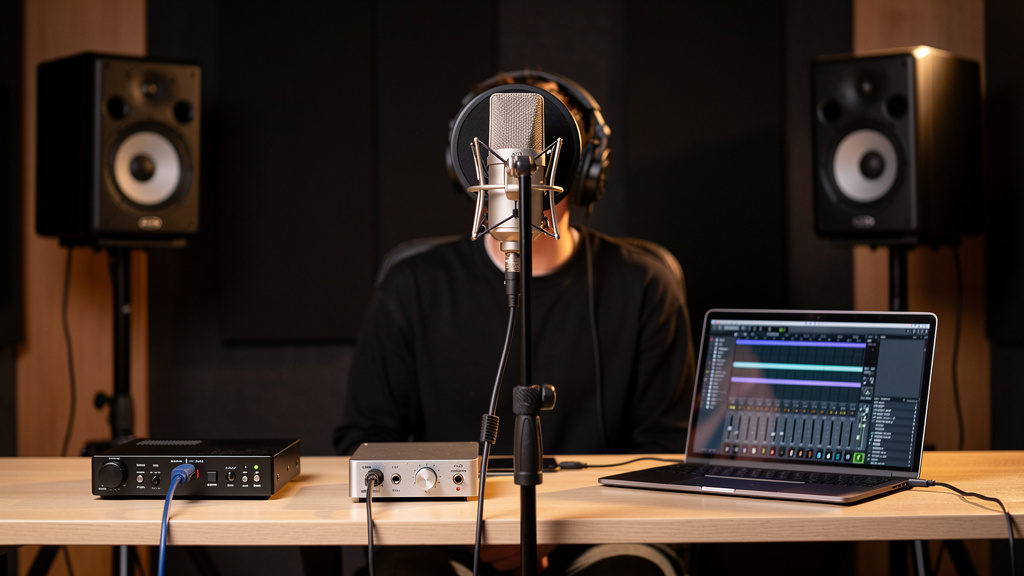
You finally get a vocalist comfortable, the mic is up, the take is there, and then it happens: “There’s a buzz in my headphones.” Not in the control room monitors. Not obviously in the recorded track. Just in the cans, right where confidence disappears and every performer starts hearing ghosts. This is one of those studio problems that feels small until it derails a session.
The tricky part is that headphone buzz is rarely random. It usually points to a specific part of the cue chain behaving badly under load, at high gain, or in close physical contact with power supplies and adapters. If the mains are clean but the headphones are not, that narrows the field more than most people realize.
Here are the five most common causes I see in small studios, project rooms, and podcast setups, ranked by how often they waste an afternoon.
1. The headphone amp is sharing dirty power with the wrong stuff
A headphone system can be the first place a power problem becomes audible. Why? Because cue amps often sit at the end of a long chain with a lot of gain, feeding transducers pressed directly against someone’s ears. A little hash that seems harmless elsewhere becomes impossible to ignore in headphones.
The classic setup is a headphone amp or interface powered from the same strip as laptop chargers, LED lighting supplies, phone bricks, bus-powered hubs, or a display with a noisy internal supply. None of those devices has to be “broken” to pollute the line. They just have to be electrically messy enough that the headphone stage hears it.
Listen to the character of the noise. A smooth 50/60 Hz hum and its harmonics suggests one kind of issue. A raspy buzz, whine, or fizzy edge often points toward switching power supplies and digital devices sharing power in an unfriendly way.
A useful first test is to simplify the power neighborhood around the cue system. Temporarily remove chargers, lighting dimmers, USB power accessories, and anything with a wall wart from the same branch of the setup. If the buzz drops immediately, the problem is not “the headphones.” It is the environment feeding the headphone stage.
This is also why a headphone amp that behaves perfectly on one desk becomes noisy when moved into a rack full of power bricks and network gear. The amp did not suddenly become bad. Its new address did.
2. Unbalanced cue feeds are picking up interference before they reach the headphones
A lot of headphone buzz starts before the headphone amp ever sees signal. The feed going into it may already be contaminated.
Small studios often run cue sends using whatever cable is nearby: a spare guitar cable, an RCA pair, a TS lead that was meant for a keyboard, or a long unbalanced line draped near power. That can work in a pinch, but it is a great way to import buzz into the cue path even when your monitor path stays clean.
If your interface or monitor controller offers balanced outputs for headphone distribution, use them. Balanced lines are not magic, but they reject a lot of the interference that unbalanced runs happily collect. This matters even more when the headphone amp lives across the room, under a desk, or near extension cords and AC adapters.
Pay attention to these high-risk situations:
- Long TS or RCA runs feeding a headphone amp
- Cue cables bundled tightly with IEC power leads
- Headphone amp placed beside a power conditioner or wall wart cluster
- Extension cables crossing laptop chargers or monitor power bricks
The fix is often less dramatic than people expect. Shorter runs, proper balanced cabling where the gear supports it, and a cleaner physical route can change everything. Many engineers waste time swapping headphones when the real issue is that the cue feed arrived noisy.
3. The performer’s headphone extension cable is acting like an antenna
This one gets missed constantly because it feels too simple to be the answer. But long headphone extension cables, especially cheap or poorly shielded ones, can absolutely become part of the problem.
By the time audio reaches the performer, it is already at a vulnerable point: low-level details and high gain, often through a compact amp driving a long cable into a high-sensitivity set of headphones. Add a flimsy extension draped across power supplies, laptop chargers, pedal bricks, or under a rolling chair with a loose adapter nearby, and you have a perfect buzz collector.
What makes this confusing is that the extension may not fail all the time. Move it six inches and the buzz changes. Coil it differently and it improves. Swap performers and the complaint vanishes because their seat is farther from the offending supply.
If the noise appears only on one station in a multi-headphone setup, the extension run deserves immediate suspicion. Same if the buzz changes when the cable is touched, rerouted, or replaced.
You do not need boutique headphone cables to solve this. You need a mechanically sound, properly shielded extension of sane length, kept away from power supplies and cable piles. In practice, cable routing is often the bigger fix than cable price.
4. A laptop or USB device is contaminating the cue path
If your session depends on a laptop, bus-powered interface, USB display adapter, hub, or charging phone near the audio rig, you have a built-in candidate for headphone buzz. Digital devices often leak noise into analog audio paths through power, grounding, or simple proximity.
This is especially common in hybrid creator setups where the same workstation is handling recording, streaming, charging accessories, and feeding external screens. Everything works, technically. But the headphone output is where the compromises finally become audible.
There are a few telltale signs:
- The buzz changes when the laptop power adapter is connected or removed.
- The noise shifts when screen brightness changes or CPU activity spikes.
- The cue path is quiet until a USB hub, webcam, or charging phone joins the system.
- The headphone output on the interface is worse than the monitor outputs under the same session conditions.
That last point matters. Headphone circuits in compact interfaces are often working harder than people think. Add noisy USB power or ground contamination upstream and the headphone path may complain first.
The right response is disciplined isolation and testing, not random replacement. Remove one connected device at a time and watch what the noise does. The pattern usually tells the story faster than specs do.
If you want a structured way to think through those patterns without bouncing between contradictory forum threads, this interactive noise-tracing workbook is a useful resource. It is particularly good for separating power, grounding, and signal-routing issues that can sound similar in headphones.
5. The buzz is actually in the monitoring path, not the recorded signal
This is the one that causes the most confusion with artists: they hear noise, so everybody assumes the mic chain is bad. Sometimes it is. But often the recording path is fine and only the monitoring path is compromised.
For example, a vocalist may be listening to a cue mix with a hot software return, an overcooked headphone amp, and a noisy direct-monitor blend. The track being recorded can still be clean. What they are hearing is a monitoring artifact created after the mic preamp stage, not noise being printed into the take.
That distinction matters because it changes where you troubleshoot. If the recorded waveform is clean during playback through the speakers, stop blaming the microphone, preamp, or room for a moment. Start tracing the cue path specifically:
- Source output feeding the headphone mix
- Any monitor controller or cue box in between
- Headphone amplifier gain structure
- Extension cable and headphone condition
- Power and USB devices near the performer position
Gain staging plays a role here too. A weak source feeding a headphone amp cranked too high will exaggerate whatever low-level junk is riding along. Often the buzz is not created by the final device, just exposed by it.
This is why “the headphones are noisy” is not really a diagnosis. It is a location report. The useful question is whether the noise exists in the source, enters along the route, or appears only when the cue system amplifies an already marginal signal.
How to narrow it down fast
When time is short, resist the urge to change five things at once. A calm, limited set of swaps tells you more than an hour of guesswork. Keep the test simple:
- Listen to the same cue on a different pair of headphones at the same station.
- Move that same pair to another headphone output or amp channel.
- Temporarily remove extension cables and plug directly in.
- Disconnect laptop chargers, USB hubs, and nearby wall warts one by one.
- Reroute the cue cable away from AC and power bricks.
Those five moves will usually tell you whether you are dealing with a headphone problem, an amp problem, a feed problem, or a power-contamination problem. You do not need to tear the whole room apart to get a direction.
The practical takeaway
If your mains sound fine but the headphones buzz, treat the cue path as its own system. Most of the time the culprit is not mysterious and not expensive: dirty shared power, an unbalanced feed, a bad extension run, a noisy USB device, or gain staging that makes a small problem loud. Find which stage adds the noise, and the fix usually becomes obvious. That is how you keep a headphone complaint from turning into a lost session.
Comments (0)
Leave a Comment
No comments yet. Be the first to comment!