Why Your Monitor Cable Is Acting Like a Radio Antenna
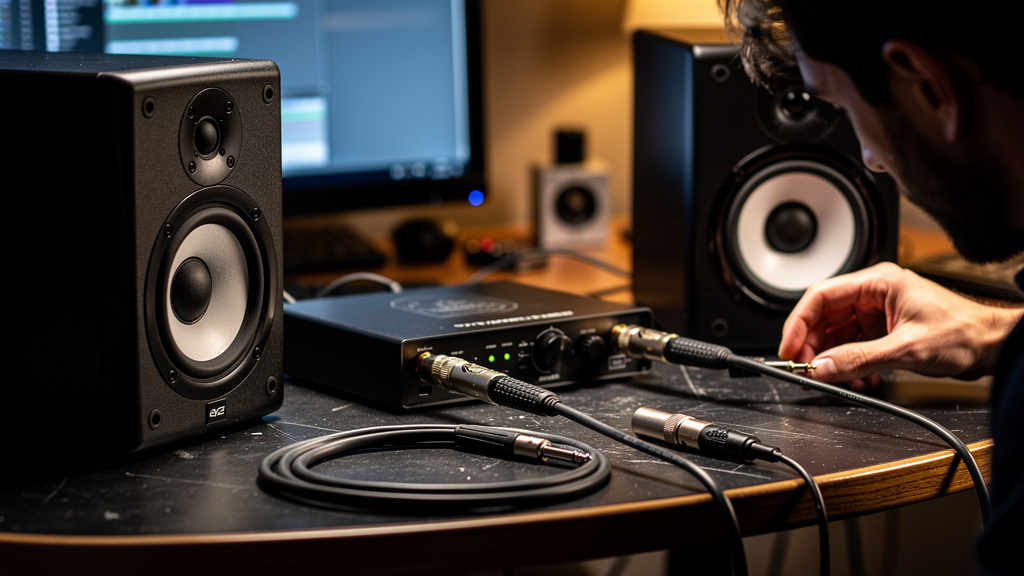
You sit down ready to work, hit play, mute the track for a second, and there it is again: a faint voice under the speakers, a burst of static crackle, maybe a talk-radio cadence hiding behind your mix bus. It is distracting in a way only studio noise can be. Not loud enough to scream disaster, but just persistent enough to break concentration every few minutes. And once you hear it, you cannot stop listening for it.
The good news is that this kind of interference is rarely a sign that your whole room is cursed. You do not need to wrap the walls in foil, abandon the building, or start buying random “fixes” from forum threads. Radio frequency interference gets into a studio through specific weak points. Find those points, and the room gets quiet again.
RFI is not magic. It is a signal finding a bad entrance.
When AM or FM audio shows up in your monitors, what you are hearing is not the radio station somehow broadcasting directly through your speaker cones. The station’s RF energy is being picked up somewhere in your signal path, then partially demodulated by a circuit or connection that was never meant to behave like a radio receiver.
That matters, because it changes the way you think about the problem. If the entire room were the problem, the fix would be huge, expensive, and vague. But in most small studios, RFI enters at one or two vulnerable spots:
- Poorly terminated cable ends
- Loose or oxidized connector joints
- Unbalanced runs feeding active speakers or interface outputs
- Cheap adapters stacked together
- Inputs with compromised shielding continuity
- Active circuits sitting behind a high-impedance source
That is why two nearly identical setups can behave completely differently in the same room. One chain has a clean, low-impedance, well-shielded path. The other has one imperfect connection acting like a tiny antenna and detector.
Why the room-wide “shield everything” advice misses the point
There is a persistent myth that radio bleed means your studio needs extreme environmental shielding. People imagine copper mesh in the walls, special paint, isolation transformers everywhere, or relocating the entire rig to another side of the building.
Those approaches come from a misunderstanding of where susceptibility lives. In a typical music or podcast studio, the problem is usually not the air in the room. It is the boundary where signal, shielding, and active electronics meet.
A cable shield with poor contact at one end can stop behaving like a shield. A connector with slight corrosion can create a nonlinear junction. An adapter chain can break the integrity of what looked like a balanced path. A monitor input stage can become more vulnerable if the source feeding it is compromised upstream. None of that requires a radio tower next door. A strong local station plus one weak joint is often enough.
This is exactly why random upgrades so often disappoint. Better monitors will not fix a contaminated connection. More acoustic treatment will not stop RF ingress. A power conditioner may be useful for other reasons, but it will not solve a cable acting like an antenna. If you want the real pattern behind these issues, Kill the Noise lays it out visually in a way forum threads almost never do.
The connector is often the real culprit
Studios tend to think in terms of gear pieces: interface, monitor, preamp, patchbay, power strip. RFI problems often live one level smaller than that. The weak point is frequently not the device but the place where two conductors and a shield are joined and expected to behave properly across the audio band while rejecting RF.
At audio frequencies, a marginal connection may seem fine. Your signal passes, the meter moves, the session runs. But radio frequency energy is less forgiving. The same joint can behave badly when exposed to a strong broadcast field. A slightly loose XLR shell bond, a TS cable where a balanced run should exist, or an input hanging on an adapter can become the path of least resistance for RF trouble.
This is also why RFI can seem inconsistent. You move a cable and the station disappears. You touch a connector and the crackle changes. You reroute one monitor lead away from a power supply and the voices get fainter. That does not mean the problem is imaginary. It means the system’s vulnerable geometry just changed.
Signs you are dealing with RF ingress, not ordinary hiss or hum
Noise problems get lumped together, but the texture tells a story. Before you buy anything, listen carefully to what kind of contamination you actually have.
RFI tends to show up with a few recognizable behaviors:
- Speech-like content: You can almost make out a presenter, ad copy, or music bed under the noise.
- Static crackle that changes when cables move: Mechanical repositioning alters the intensity.
- One input path is much worse than another: The issue follows a specific route, not the whole room equally.
- Active gear makes it more obvious: Powered monitors, interfaces, headphone amps, and mic preamps can reveal it more than passive paths.
- The problem appears even with normal power: It is not tied neatly to dimmers, appliances, or mains load changes.
That last point is important. Many people treat every studio noise as a power issue first. Sometimes it is. But broadcast bleed has its own fingerprint. If you hear actual program material, or something close to it, you are not chasing ordinary self-noise.
Where small studios are most exposed
Some setups invite RF trouble without anyone noticing during the build. The studio still passes signal, so nobody suspects the layout until the interference becomes impossible to ignore.
The most common exposure points include:
- Long monitor runs near wall-wart power supplies, routers, LED controllers, or computer bricks
- Adapter-heavy desktop rigs with mini-jack, RCA, TS, and XLR all chained together
- Patch points with wear, oxidation, or loose mechanical fit
- Bus-powered devices with compromised shielding through inexpensive cables
- Unbalanced synth or playback outputs feeding sensitive active circuitry over unnecessary distance
- Monitor inputs left on a less suitable sensitivity or connection type than the system really needs
Notice that none of these examples require exotic failure. They are everyday studio decisions: a cable that was “good enough,” an adapter used for convenience, a connection reused for years without inspection. RFI lives in those details.
What actually moves the needle
You do not need a giant shopping spree. You need a clean logic path. The winning mindset is simple: reduce the system’s ability to receive RF, and remove the junctions that can decode it into audible garbage.
That usually means working in an order like this:
- Identify the exact path carrying the interference. Not the whole desk, not the whole room. The path.
- Reduce unnecessary cable length and adapter chains. Every extra joint is another opportunity for ingress.
- Restore proper shielding continuity. A shield only works when the termination is actually solid.
- Prefer robust balanced connections where the gear supports them. Balanced lines are not magic, but they are far less hospitable to this kind of problem when implemented properly.
- Inspect the mechanical condition of connectors. Loose, worn, and oxidized parts are not neutral details.
- Keep vulnerable audio runs away from local RF-rich clutter. Routers, switching supplies, and desktop electronics add to the mess even when the broadcast source is external.
The key is that these are targeted corrections, not superstition. You are not “trying things.” You are tightening the exact places where RF gets converted into something audible.
Why expensive gear can still fail here
One of the most frustrating parts of RFI is that premium equipment does not make you immune. A high-end interface connected through a sloppy adapter chain can still pick up a local station. A quality monitor fed by a compromised cable is only as quiet as the weakest connection before its input stage.
That is not a criticism of the gear. It is a reminder that system integrity matters more than price tags. Audio people love comparing converters, monitor voicing, and preamp flavor. But RF immunity is often won or lost in the boring physical details: connector fit, cable construction, termination quality, grounding architecture within the signal path, and whether the run is balanced from end to end rather than balanced only in theory.
A studio can sound world-class and still be one bad connector away from becoming an accidental radio.
The relief is real when you stop guessing
Once you understand that RFI enters through vulnerable joints instead of “infecting the room,” the whole problem becomes less mysterious. The fear drops away. You stop imagining structural fixes and start thinking like a signal path troubleshooter.
That shift is what gets people out of the loop of buying one more box, one more cable, one more power product, hoping the noise will vanish by accident. Radio bleed is fixable, and in many studios it is fixable without dramatic expense. What it does require is a disciplined way of tracing susceptibility instead of reacting to symptoms.
If your monitors are leaking voices, static, or that strange almost-broadcast chatter that ruins focus, a structured resource is worth far more than another night of conflicting advice. Kill the Noise workbook is a strong place to go when you want a radio-free room built on method, not guesswork.
Comments (0)
Leave a Comment
No comments yet. Be the first to comment!