Top 5 Cabling Mistakes That Keep Studio Noise Alive
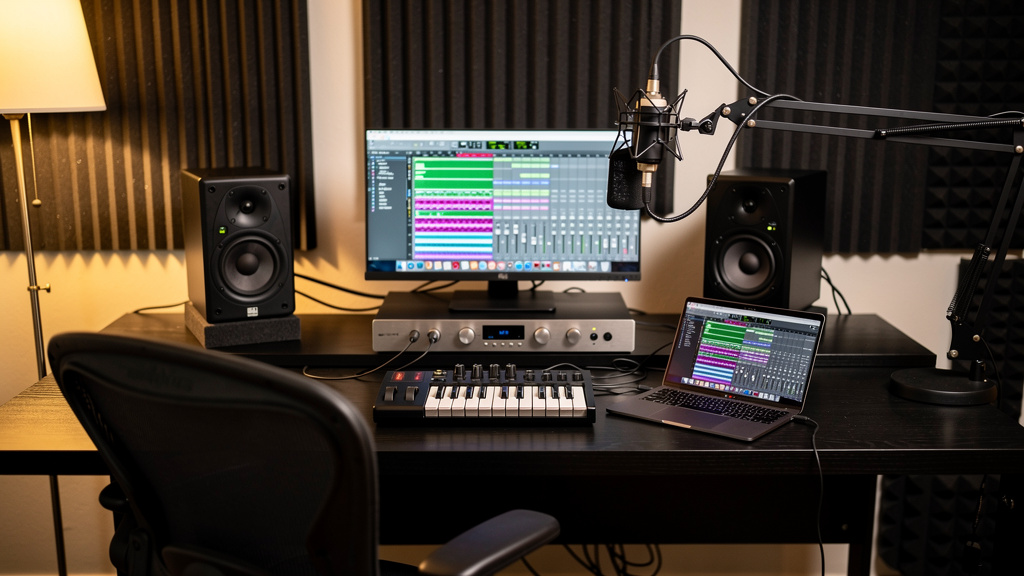
You finally upgrade the interface, swap in decent monitors, and buy the “good” cables because you are done fighting noise. Then you arm a vocal track, turn up the speakers, and there it is again: a faint buzz, a whine from somewhere in the computer world, maybe a strange thinning-out in the low mids that makes everything feel smaller than it should. That is the maddening part. The gear is better, but the signal path still feels fragile.
A lot of studios get stuck here because cable problems do not always sound dramatic. Sometimes they show up as obvious hum. Sometimes they show up as hashy top end, weak level, radio-frequency junk, or a mix that never quite feels solid. And very often, the fix is not buying more expensive cable. It is understanding what balanced lines actually do, where unbalanced runs still make sense, and how shields and grounds can quietly sabotage a clean signal path.
Here are the five cabling mistakes that keep noise alive in otherwise capable rooms.
1. Using the wrong kind of connection just because the plug fits
This is the classic studio trap: quarter-inch connectors on both ends, so it must be the same thing. It is not. A TRS cable can carry a balanced mono signal, while a TS cable carries an unbalanced one. They look similar at a glance, but electrically they behave very differently.
A balanced connection sends the audio on two conductors with opposite polarity, plus a shield. At the receiving end, the wanted signal is reconstructed and any interference picked up equally along the run gets rejected. That common-mode rejection is the reason balanced lines are so valuable around computers, power supplies, LED lighting, wall warts and all the other noise sources modern studios live beside.
An unbalanced line uses one conductor for signal and the shield as the return path. That is fine for some instruments and some short consumer-level connections, but it is much more exposed to interference and grounding issues over distance.
The practical problem is that not every TRS jack is balanced, and not every device with quarter-inch I/O is meant to be wired the same way. Some outputs are balanced line outs. Some are stereo headphone sends. Some inputs are instrument inputs expecting TS. If you treat every jack like generic audio I/O, you can end up with extra noise, level loss, or a signal that feels oddly weak and phasey.
When a setup sounds worse than the price of the gear suggests, this is one of the first places to look. Not “Is the cable premium?” but “What is this port actually designed to carry?”
2. Running unbalanced cable farther than the room will forgive
Unbalanced connections are not evil. They are normal. Guitars, basses, many synth outputs, some pedalboards, and plenty of consumer gear still use them. The trouble starts when people treat them like they are just a cheaper version of balanced lines and stretch them across the room.
Long unbalanced runs act like antennas. The longer the cable, the more opportunity it has to collect electromagnetic garbage from power bricks, monitor supplies, computer displays, USB devices, routers and lighting dimmers. That noise then rides right alongside your signal.
In a small room, cable length gets wasted surprisingly fast. If your interface is on one side, your outboard or instruments are on the other, and the cable takes the scenic route behind furniture and power strips, you may have created a perfect path for interference without realizing it.
As a rule of thumb, balanced lines are what you want for monitor feeds, line-level outboard sends and returns, and any run that has to travel through a noisy environment. Unbalanced lines are better kept short and intentional. If a source has to travel farther, that is when a proper DI or reconfiguration of the signal path starts making sense.
This is also where people chase the wrong culprit. They hear noise from a long unbalanced run, buy a more luxurious cable, and get disappointed when the problem barely changes. The issue was not plating. It was physics.
3. Assuming gold-plated connectors fix a bad signal path
Gold plating has its place. It resists corrosion well, and in some environments that matters. But it does not magically lower your noise floor, heal a ground loop, or turn an unbalanced connection into a balanced one.
If your monitors are humming because two pieces of gear are grounded in a way that creates a loop, gold-plated connectors will hum beautifully. If your synth is feeding your interface over a long unbalanced run next to AC power, a premium finish on the plug will not stop the cable from picking up interference.
This myth survives because it feels intuitive: more expensive cable equals cleaner sound. In reality, the meaningful questions are much less glamorous:
- Is the source balanced or unbalanced?
- Is the destination expecting balanced or unbalanced?
- How long is the cable run?
- Is the shield connected in the right context for this gear?
- Is the cable routed near power supplies or noisy electronics?
Good cable quality still matters. You want reliable connectors, sane shielding, solid strain relief and consistent construction. But once a cable is competently made, the bigger win usually comes from choosing the correct topology. A modest, correctly used balanced cable will outperform a luxury cable used in the wrong place almost every time.
4. Creating ground problems with mixed gear and mismatched shields
This is where studio noise gets more subtle. Plenty of project rooms combine pro gear with consumer gear: interfaces, monitor controllers, desktop synths, powered speakers, external preamps, podcast mixers, maybe a keyboard or sampler with RCA outputs somewhere in the chain. Those devices do not always share the same grounding philosophy or nominal operating level, and the shield connections can become part of the problem.
A shield is not just “extra protection.” In many unbalanced connections it is also part of the signal return path. In balanced systems it may be serving a different job, mostly screening the conductors from interference while the audio travels on the hot and cold lines. Start mixing standards casually and you can get hum, buzz, or odd changes in level and tone.
This is why adapter-heavy setups so often behave badly. A quick XLR-to-TS or RCA-to-TRS fix may pass sound, but “passes sound” is not the same as “wired correctly for low-noise operation.”
When you connect gear from different worlds, three things matter at once:
- The signal format: balanced or unbalanced.
- The operating level: mic, instrument, consumer line, or pro line.
- The grounding relationship between the two devices.
If even one of those is handled casually, noise can show up in ways that feel random. This is exactly why so many studio owners bounce between forum threads and contradictory advice. The symptom sounds familiar, but the wiring context is different every time. If you want a clearer way to think through those interactions without guessing, Kill the Noise is a useful resource because it maps the problem visually instead of treating every buzz like the same buzz.
5. Routing audio and power as if cable placement does not matter
Even when the cable types are correct, placement still counts. Audio lines and power lines do not need to become mortal enemies, but they also should not be bundled together thoughtlessly under a desk and left there forever.
AC power creates fields. Power supplies, chargers and transformers can radiate noise. USB cables and computer gear can add their own layer of hash. If your audio cable runs parallel to those sources for a long stretch, especially if it is unbalanced, you are increasing the odds of contamination.
A cleaner room usually comes from a few simple habits:
- Keep audio and AC power separated where practical.
- If they must cross, cross at right angles rather than running side by side.
- Avoid coiling excess cable tightly around power bricks or adapters.
- Keep wall warts and power supplies away from sensitive analog audio paths.
- Use the shortest sensible cable run rather than the longest cable you happen to own.
None of this is glamorous, but it is the kind of housekeeping that preserves dynamic range. Noise is cumulative. Each bad choice may only add a little, but by the time the signal reaches the monitors, the room starts feeling smaller, flatter and more fatiguing than it should.
If that idea sounds familiar, it is because signal-path problems rarely stay in one lane. The same kind of hidden weakness that adds interference can also show up as headroom trouble farther down the chain. If you have ever had a cue mix fall apart before the master bus even looks busy, this piece on why a headphone mix distorts before the master bus clips connects well with the same larger issue: what the meters say is not always the whole story.
What a robust studio path actually looks like
A quiet studio is usually not the result of one miracle cable. It is the result of a signal path where each connection makes sense. Balanced outputs feed balanced inputs when possible. Unbalanced sources stay short or get converted properly for longer travel. Shields are treated as part of the system, not decoration. Power and audio are routed with intent.
That is the real promise of cleaner cabling: not audiophile bragging rights, but stability. Your monitors stay quiet when they should. Your recordings keep their body. Your gain staging works the way you expect because low-level junk is not eating into your usable range. And your expensive interface finally sounds like it belongs in the room.
When noise drops, the first thing most people notice is not silence. It is confidence. You stop second-guessing every hiss, every faint whine, every weird brittle edge on a track. You can hear the source again. That is what good cabling is really buying you.
Comments (0)
Leave a Comment
No comments yet. Be the first to comment!